
Nesse ciclo de migração de aplicativos para plataformas mais justas e se possível de código aberto e após um papo sobre gerenciadores de referência, que ficarão para outro momento, decidi que era hora de me libertar do Notes da Apple.
A real é que antes eu usava o Evernote, mas ficou pesado pois a conta gratuita já era muito limitada e perdi acesso a vários arquivos. Acabei exportando tudo que deu e nunca mais olhei pra esse software. Fiquei refém do Notes e órfão de uma solução melhor.
Com a libertação do Notes eu poderia voltar a ter um bom aplicativo de notas. Um dos objetivos era ter a capacidade de guardar minhas anotações em outros locais que não nos servidores da própria produtora do aplicativo, usualmente de uso obrigatório, como o iCloud ou os servidores da Evernote.
Numa busca no DuckDuckGo, sim eu evito o Google, eu encontrei esse post da Open Source Alternatives fazendo umas comparações interessantes.
A primeira opção parecia ser o Notesnook, um substituto direto do Evernote. No entanto no fim da leitura me deparei com o Joplin, seu editor baseado em markdown me agrada pois é o que uso já faz muito tempo pra anotações, documentos e até no meu site.
Fazendo uma propaganda de como o markdown no Joplin pode ser incrível, vou deixar três exemplos que me brilham os olhos:
Fórmulas matemáticas e químicas. Suporte fornecido através do KaTeX
Diagramas com Mermaid.
graph TD;
    Novos_Hobbies-->Cantar;
    Novos_Hobbies-->Crochet;
    Cantar-->Pop;
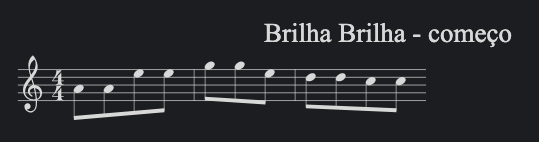
Anotações musicais com ABC
Onde isso:
```abc
T: Brilha Brilha - começo
M:4/4
AAee|gge|ddcc
Vira isso:
Além disso ele possui o Joplin Cloud que não é muito caro para fazer a sincronização dos arquivos. No entanto o que me ajudou a definir-lo como escolha é sua capacidade para se conectar com outras diversas alternativas facilmente utilizáveis para sincronização e armazenamento - Dropbox, NextCloud, OneDrive, S3 e WebDAV.
Vale ressaltar que não é que outros não permitam usar armazenamento e sync próprios, mas as opções do Joplin e a solidez do software, existindo desde de 2016, fazem sentido pra mim. É importante procurar soluções que façam sentido para o uso de cada um, possivelmente minha escolha pode ser boa para alguns de vocês.
Por último estão os muitos plugins, mas esses eu quero fazer um conteúdo separado pra dar os devidos detalhes caso eu realmente ache algo muito interessante e/ou util.
Comece aqui se você só quer instalar e usar
Para instalar basta acessar essa página e escolher a plataforma (win, mac, linux, mobile).
E em seguida migrar as notas com um guia bem amplo e fácil de usar no site da Joplin. A sequência foi a seguinte:
1 - instalar o Exporter.
2 - exportar as notas pelo exporter.
3 - abrir o Joplin e seguir com a importação da pasta gerada, siga o guia aqui.
4 - Pronto, as pastas aparecem no aplicativo.
Já para o sync, eu conectei a conta do Dropbox, a gratuita mesmo, no computador e no celular e pronto.
Agora eu me livrei do notas e do uso do iCloud pra esses arquivos. Foi fácil e indolor.
Inclusive esse post foi escrito já no Joplin 💖✌🏽.